How to Recover a Hacked TikTok Account, Fast.
The account belonged to my dog, Olive. Just a “small Chihuahua trying to make it in a big world”, as her bio so proudly says. Her slice of social media exists in a peculiar corner of TikTok—one where the majority of her “fans” are other dogs and their devoted owners. Her most popular videos? One where she complains about needing a heated blanket in the summertime, and another where, in response to a comment, I explain how she has a heart condition and what we are doing to help her live longer. Over the course of two years, I built her following to an impressive 1,400 fans. It’s silly, but I worked hard on this account, with every clip created from scratch.
The week before Thanksgiving, someone got in.
They used a password that was leaked on another platform. I caught the login almost immediately. Changed the password. Turned on two-step. Thought that fixed it.
It didn’t.
Ah shi..
TikTok doesn’t log out existing sessions when you reset your password. And the two-step only stops new devices—not ones already approved. The hacker stayed logged in.
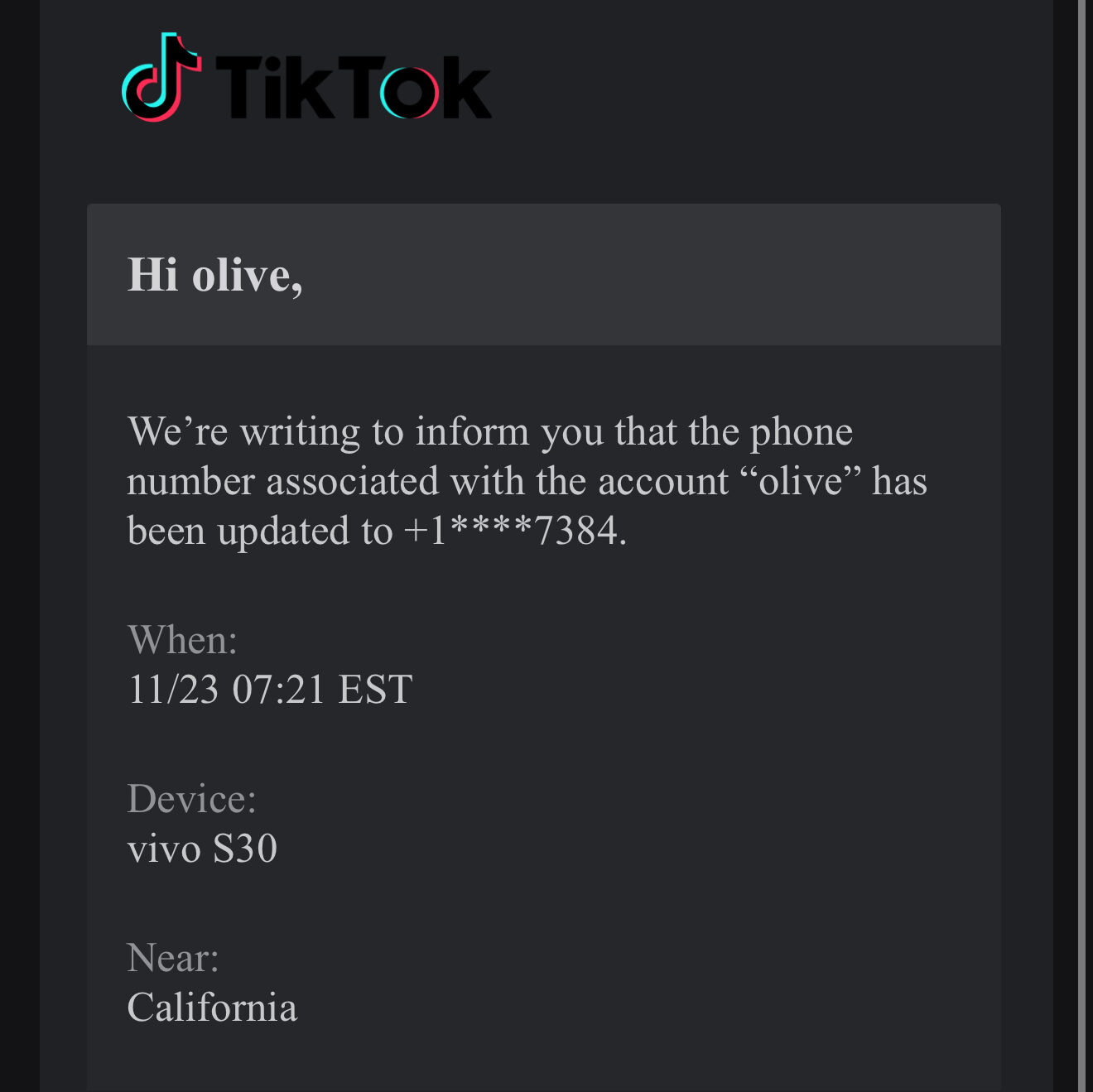
They waited a whole week. Then flipped everything: changed the username, email, and phone number. Flooded the account with fake followers—taking it from 1,400 to 5,500 overnight. That triggered Automatic enrollment in the Creator Program (yay!). They linked TikTok Shop products. Uploaded spammy videos in mass. Then the violations started.
From the outside, it looked like I sold my account. On the backend, it tripped every spam and monetization flag TikTok has.
Step One: Gaining Back Control
Nov 23, 10:17 AM
Submitted TikTok’s official Account Hacked form. Because they changed everything, I had to write them from a different account.
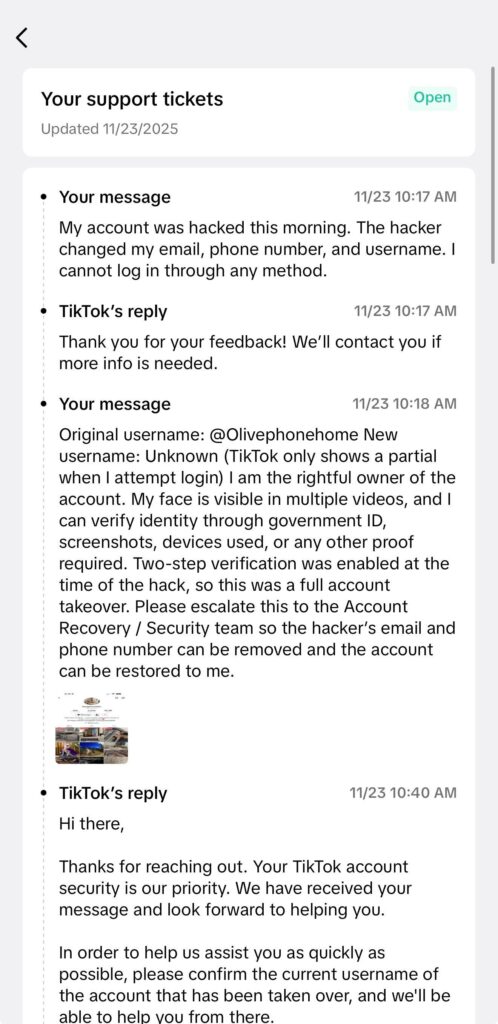
Also opened an in-app support ticket (Settings → Report a Problem → Login → Hacked → Need More Help?).
TikTok requested:
- Sign-up date, location, and devices used
- Linked accounts
- While I preemptively submitted ID verification and photos of Olive, along with handwritten signs, before TikTok formally requested them, support requested them again, along with some original sign-up date, registered device, and more.
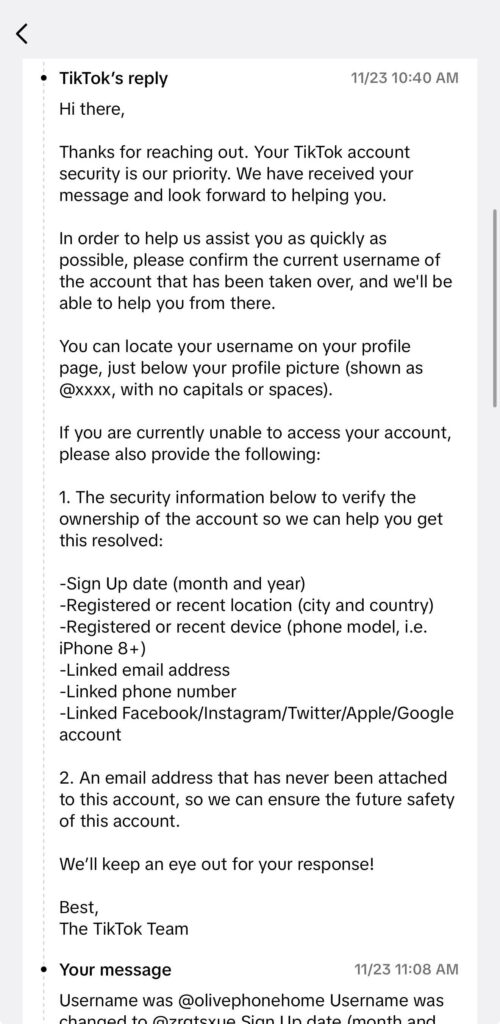
Nov 24, 9:02 PM: TikTok restored access and linked the account back to a new secure email.
Step Two: Assessing the Damage
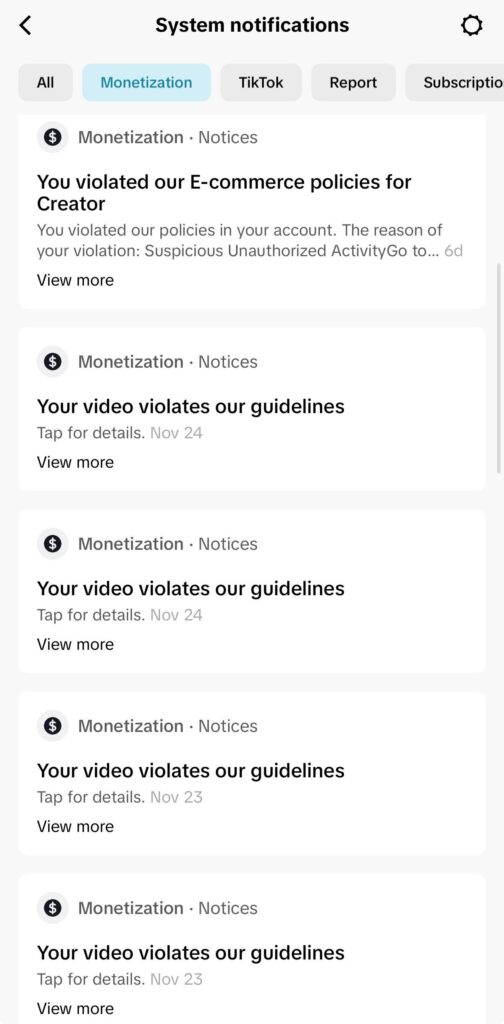
Violations on violations racked up by the hacker in under 2 days
Getting the account back didn’t fix anything else. Here’s what was still broken:
- The hacker uploaded multiple unoriginal spam videos in a burst, leveraging the account’s clean history to temporarily boost visibility before TikTok flagged them
- Creator Fund eligibility triggered by bot followers past the 5k mark (silver lining maybe?)
- Suspicious unauthorized activity warning from TikTok Shop
- Monetization violations blocking me from participating in the Creator Fund (no silver lining)
- Multiple guideline flags on Nov 23 and 24 blocking my account from participating in anything
- Video reach capped at ~20 views
- Trust score crushed
Step Three: Appealing the Violations
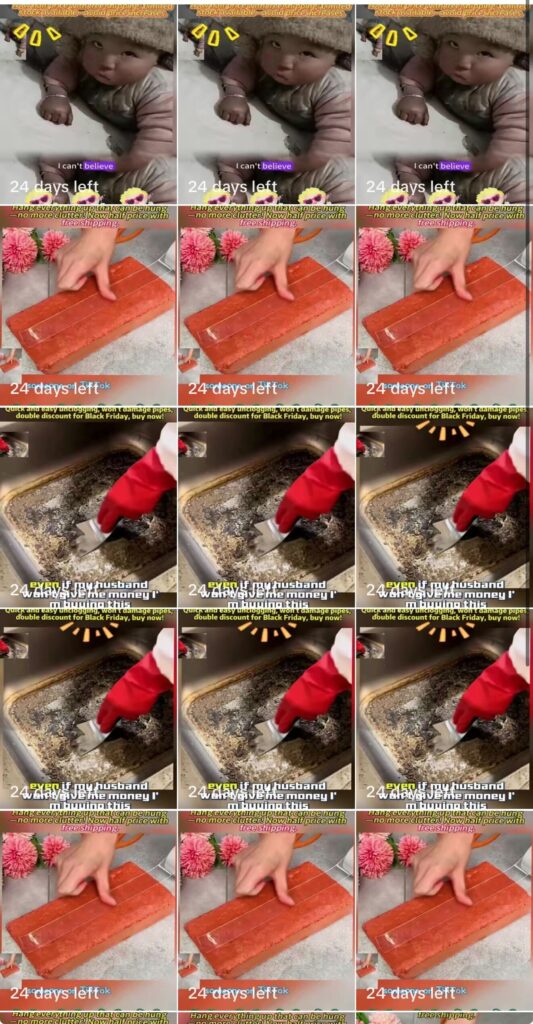
Spammy TikTok shop videos took over my profile
The hacker didn’t just inject followers—they also posted a batch of spam videos back-to-back. These videos:
- Were scraped or recycled from known ad farms
- Promoted cleaning tools, kitchen hacks, or fake countdown sales
- Used overlays like “24 days left” and “Even if your husband won’t give you the money…”
- Exploited the account’s previously good trust score to get fast distribution before TikTok shut them down
The content directly violated commerce and originality guidelines, which triggered TikTok Shop penalties and spam filters. Including screenshots of these uploads in my support ticket helped confirm the takeover.
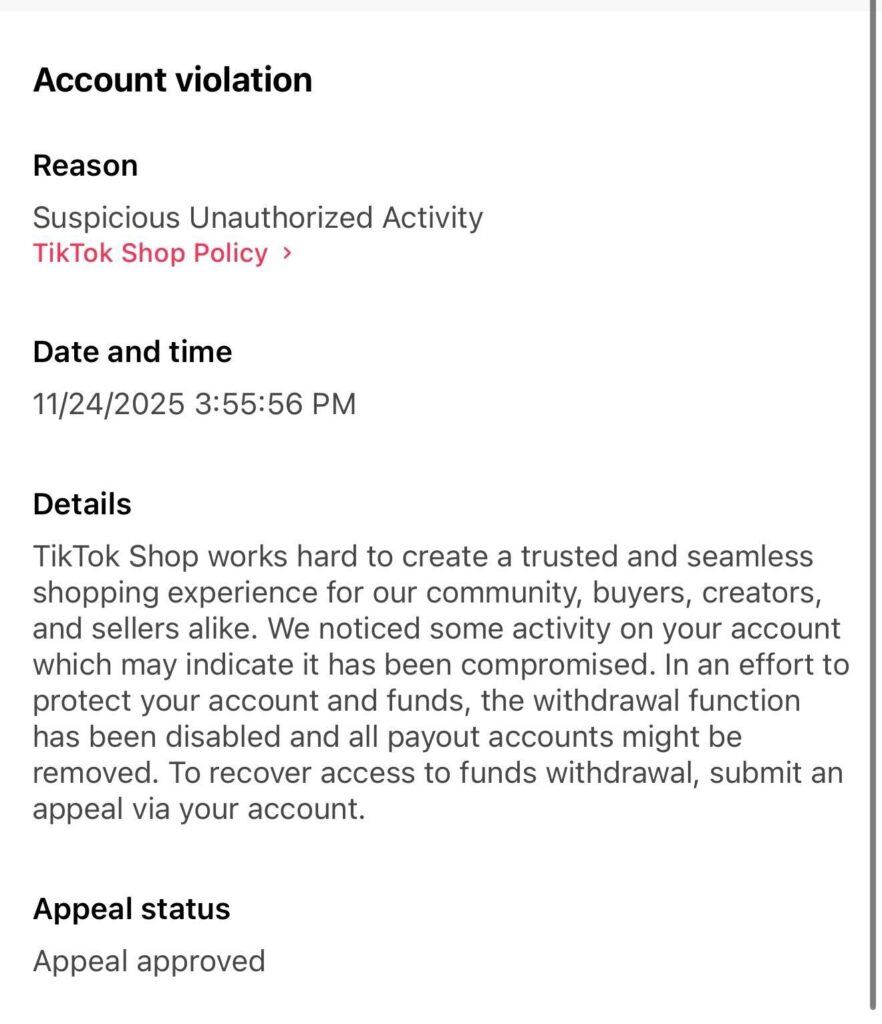
Record time turnaround on my appeals
Each flagged video and system strike was appealed using this line:
“This violation was caused by a confirmed account hack. Please review in the context of a takeover.”
This helped reverse some monetization violations, including a TikTok Shop policy strike.
Step Four: Removing Fake Followers
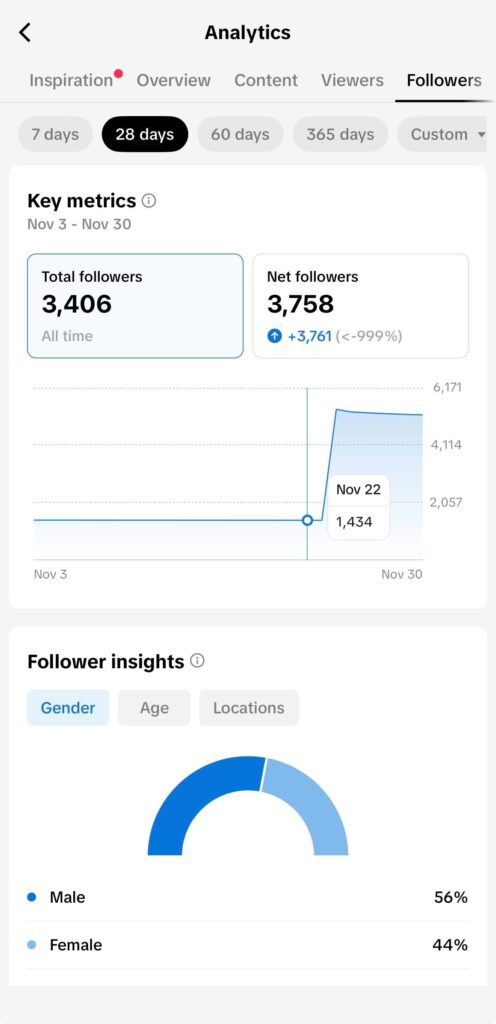
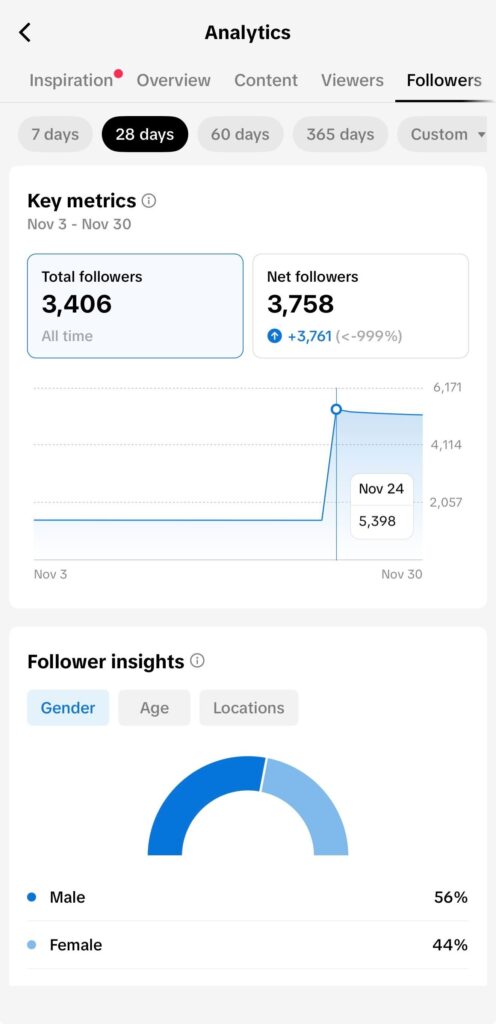
Before the hack and after
I submitted a ticket requesting that TikTok remove the artificial followers and reset the trust score. TikTok closed it almost immediately, which I took as a dead end.
Then the sweep hit.
The follower graph plunged just as dramatically as it had spiked. The account had jumped from 1,434 to 5,398 on November 23. By November 30, it had returned to the low 3,000s. The location breakdown revealed what I had already suspected: nearly 60 percent of the followers were marked as “Other,” with the rest clustered in regions that my audience does not typically come from. Classic bot patterns.
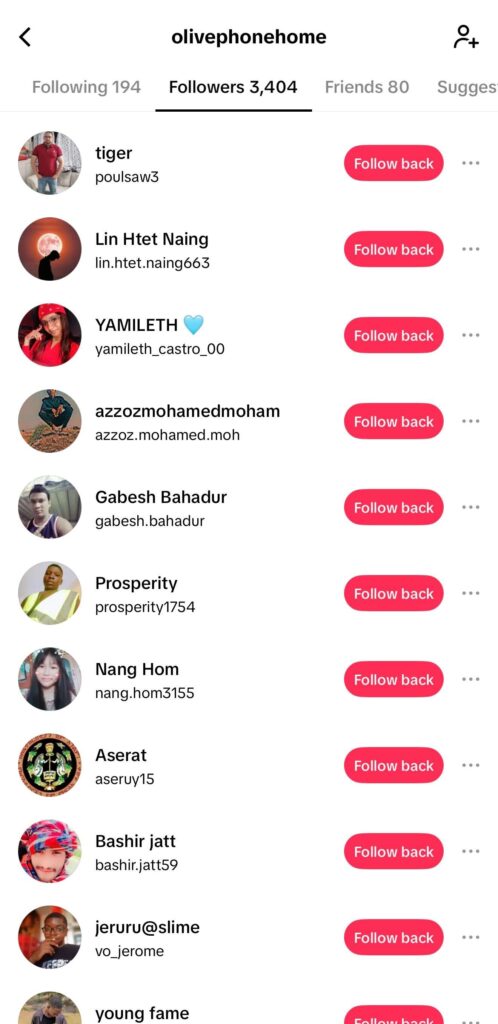
My new “biggest fans“
Overnight, the number dropped again, landing around 1,444 by December 1—almost exactly the same as my original audience. The inflated followers, the suspicious geography, the distorted insights: gone. The profile finally looked like itself again.
And here’s the surprising part. I didn’t submit a second request. The cleanup happened after the ticket had been closed.
If you ever get hit with a bot injection, support may not respond, but file the ticket anyway. A closed ticket can still trigger a backend purge.
Step Five: Requesting a Trust Score Reset
TikTok has an internal action called an Account Integrity Reset. Support won’t offer it unless you use the right language.
Submitted:
“Requesting an Account Integrity Reset due to fraudulent activity from a hacker.”
That request helped restore reach within days.
Step Six: Locking Down the Account
After recovery:
- Removed all unknown devices in TikTok Security settings
- Enabled 2FA on all logins (email, Apple ID, TikTok)
- Revoked third-party access
TikTok won’t notify you if someone logs in from a new device. You have to look. But after all that, Olive was back online.
Step Seven: Rebuilding After Reset
After requesting the reset and locking down the account:
- I posted a single video to test the waters — it flatlined at 50 views and stayed there. I left it up, but I stopped posting anything else for 72 hours to give the account a chance to stabilize.
- During that downtime, I posted a couple of low-stakes Stories and waited for TikTok to let me reset the username from the garbled mess the hacker left behind. I also took advantage of the weird, temporary follower bump to explore features I’d never had access to before.
- After the 72-hour pause, I posted another test video — and this time, the reach behaved like a real account again. It hit 600 views within the first few hours.
Key Phrases TikTok Responds To
- “My account was hacked. The hacker changed my email, phone number, and username.”
- “I am the original owner and can verify my identity.”
- “This violation was caused by a confirmed account hack. Please review in the context of a takeover.”
- “Please remove all bot follower activity and reset my account’s trust score.”
- “Requesting an Account Integrity Reset due to fraudulent activity from a hacker.” Note: that this exact phrase has not been publicly confirmed, but is more of a shorthand for a longer internal platform process
- “Account Restoration Request – Compromised Account With Fraudulent Follower Injection.”
Why This Isn’t Just a One-Off: A Broader Look at Social Media Hacks
What caught me off guard in all of this was how familiar the pattern felt. A tiny, quiet account with a clean trust history is just as attractive to a hacker as a big one. Sometimes it’s more attractive. It blends in, it doesn’t raise alarms, and it’s easy to hijack.
We’ve seen versions of this everywhere. Twitter’s 2020 breach exploited internal access rather than some mastermind-level exploit. TikTok had its own scare in 2023 when the R00TK1T group claimed they could access or delete accounts at will. TikTok denied it, and the data was questionable, but the panic was real.
Security and fraud-prevention firms have noted that bot followers can quietly infest TikTok accounts, distorting analytics and hurting long-term credibility. Some analyses even show that TikTok performs periodic “bot purges,” where suspicious follower patterns trigger sharp drops as fake accounts are removed. Business-focused TikTok guides echo this, recommending regular follower audits and manual removals to protect engagement metrics. Taken together, these reports suggest that both automated systems and manual interventions can restore a cleaner, more accurate follower list when bot activity gets out of control.
And to be clear, I need to give credit where credit is due. TikTok support actually moved quickly. Once I got the right tickets in, they jumped on the case and resolved the login portion fast. The part nobody warns you about comes after that, when the algorithm still thinks you are the person who posted the scam videos, bought the bots, and triggered every monetization flag in sight.
That is the mess creators never see coming.
Final Thought
The irony here is chef’s-kiss perfect. The hacker could hijack the account and inflate the follower count just enough to qualify for the Creator Program, but couldn’t manage to post a single video that didn’t immediately trigger every spam alarm TikTok has. Even if I never got back in, he’d already sabotaged himself so thoroughly that the account was permanently barred from monetization. Alanis Moresette would consider it a teachable moment.
If this happened to Olive, it could happen to anyone. Hackers don’t just steal access—they steal trust. And getting your login back doesn’t mean your account is safe, clean, or visible. If you’re managing a creator profile (even a tiny one), know what to ask for before you need it.